The powerful, free macOS cleaner for Apple Silicon. Reclaim tens of gigabytes from hidden caches, developer junk, duplicate files, and leftover app remnants — with native Siri automation and on-device AI. Review every file first. Zero telemetry, only an optional launch update check against GitHub Releases.
source-available (GPLv3 + Commons Clause) · apple silicon · apple intelligence & siri · macOS 26.0+ · no telemetry
0
cleanup categories
0+
built-in paths
0
evidence types
0
telemetry — none collected
01 · Features
Native SwiftUI with On-Device Apple Intelligence
All scanning runs locally on your Mac with zero telemetry. The only network request is an optional check for new versions against the public GitHub Releases API on launch.
On-Device Apple Intelligence
Native local AI explanations powered by Apple FoundationModels. Explains files, caches, running processes, and startup agents on-device with zero latency and no cloud relay. Tap the sparkles icon anywhere to ask.
Siri & Shortcuts Automation
Native AppIntents integration for voice control and automated Shortcuts workflows. Trigger "Quick Clean", "Scan Storage", or "Uninstall App" with Siri or custom macOS Shortcuts — zero background daemons or battery drain.
Smart Cleanup (2,343 Paths)
55 categories, 2,343 path definitions covering 304+ apps and 92 toolchains — app caches, browsers, package managers, Xcode, Docker, AI assistants, orphaned leftovers, project build artifacts. Parallel scan across all cores. Risk badges after scan; you choose what to remove.
Forensic App Uninstaller
Drag & drop any .app. Scans up to 5 levels with 30 evidence types (Bundle ID, Team ID, Spotlight, plist, Launch Services). Safe or Balanced mode. Confidence tiers: guaranteed → ignore.
Duplicate File Finder
Multi-stage cryptographic engine (file size → 4 KB hash → full SHA-256) running parallel on Swift Actors. Safely detects 100% exact duplicates and protects master original files.
Navigable Disk Space Analyzer
Drill into nested directories with clickable breadcrumbs. Honest APFS physical sizing (totalFileAllocatedSize), Quick Look spacebar preview, category filters (Video / Audio / Photos / Apps / Documents / Archives). Skips dataless iCloud files. Reveal in Finder or move to Trash.
Process Manager
Flat or Grouped views. Sort by CPU, Memory, Name, or Threads. Whitelist critical apps; blacklist noisy ones for quick termination. System processes stay protected.
Startup Services
LaunchAgents and LaunchDaemons from ~/Library and /Library. Grouped into User, Third-party, and System. Load, unload, or stop — with admin prompt when needed.
Safety & Privacy First
Uninstaller and Disk Analyzer move items to Trash via trashItem(at:). Smart Cleanup removes selected caches only after you confirm. SafetyManager blocks /System, /usr, ~/.ssh, and other critical paths.
14 Languages & Liquid Glass
English, Deutsch, 日本語, Français, 简体中文, 繁體中文, Italiano, Português, Español, Русский, Українська, 한국어, Polski, العربية (RTL) — UI and error localizations. Adaptive Liquid Glass UI for macOS 27+.
02 · Screenshots
Every screen, up close
Dashboard, cleanup, uninstaller, processes, and more
Opt-in toggles: .DS_Store, Time Machine snapshots, GarageBand/Logic, iMovie/Final Cut, and Font Cache. Developer caches (Maven ~/.m2, Go GOMODCACHE, Flutter .dart_tool) are included in standard cleanup by default without separate toggles.
04 · Changelog
What's new in v2.3.0
Native macOS 27 Liquid Glass redesign, on-device Apple Intelligence explanations, Master-Detail duplicate finder, forensic trash & app lifecycle, startup service uninstaller, and 14-language localization
macOS 27 Liquid Glass & System Integration
Refined Liquid Glass Design System — fully aligned with macOS 27 HIG: chrome-focused glass navigation, glassEffectUnion pill transitions, opaque content cards, and specular button styles
Keyboard Shortcuts & Menu Bar — instant tab switching via ⌘1–⌘8, native Settings scene via ⌘,, and dedicated Cleanup History window via ⌘Y
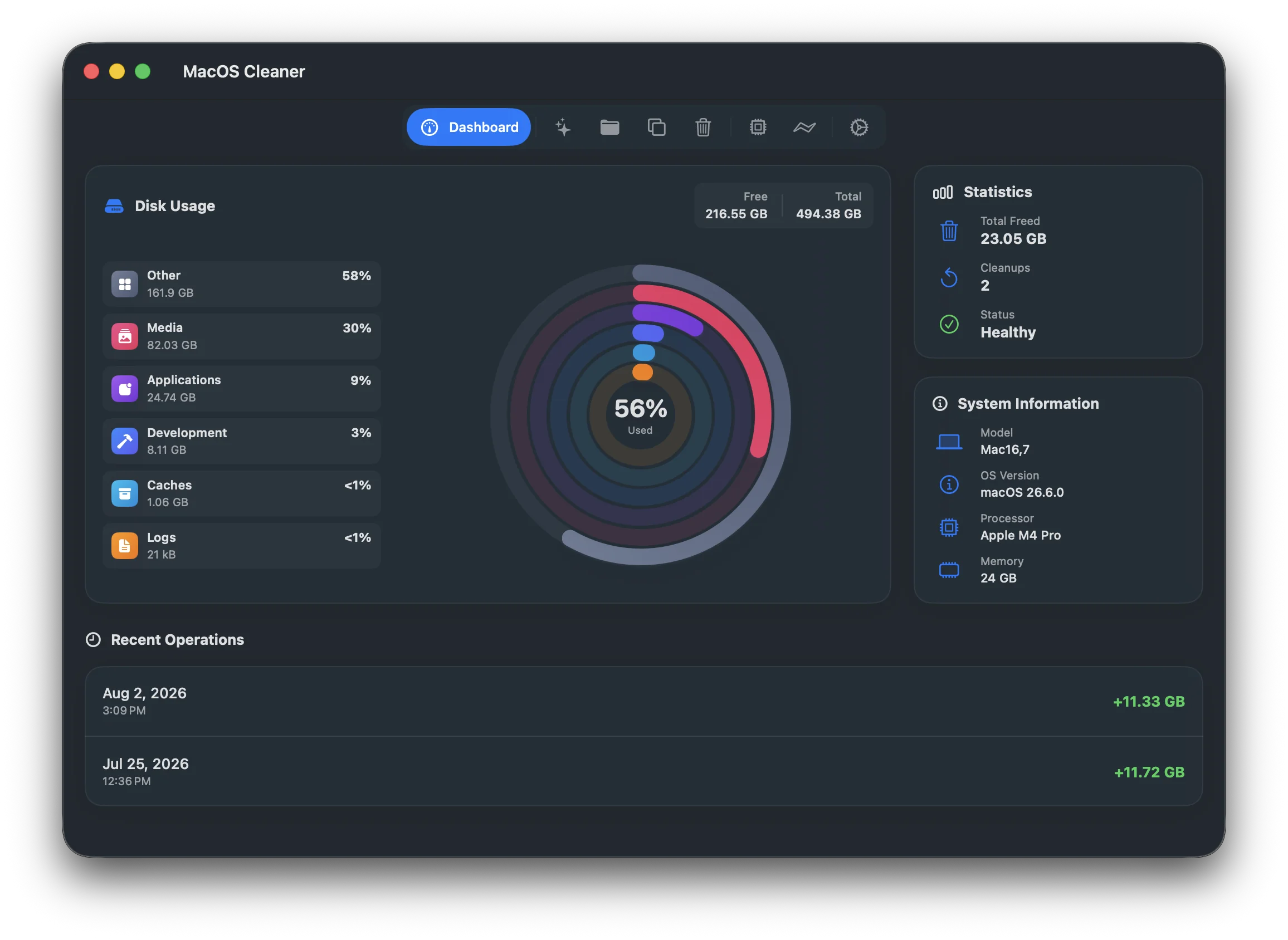
Revamped Dashboard — redesigned "Recent Operations" widget featuring a clean horizontal card layout with instant drill-down to the audit journal
Pure On-Device Apple Intelligence
Structured File & App Explanations — on-device FoundationModels (SystemLanguageModel) with @Generable structured verdicts ([SAFE], [CAUTION], [DANGER]) in uninstaller and residual sheets
Streaming Token Response & On-Device Execution — real-time token streaming via streamSession; runs locally on-device without cloud relays; system locale pre-flight check
Authenticated Siri App Intents — CleanCategoryIntent and CleanDeveloperCachesIntent enforce biometric authentication (.requiresAuthentication) and confirmation dialogs
Master-Detail Duplicate Finder & Redesigned Cleanup
Master-Detail Duplicate Workspace — redesigned on HSplitView with duplicate groups on the left, itemized paths on the right with middle-truncated paths and Quick Look (Space)
Streamlined Cleanup View — clean 880 pt layout featuring a 4-item base cleanup row and expanded 2×2 parameters grid
Safe Media Maintenance — removed destructive cloud/voice memo toggles; GarageBand/Logic and iMovie/Final Cut strictly target cache directories without touching user sound/video libraries
Forensic Lifecycle, Trash & Safety Engine
3-Second Graceful App Quitting — soft terminate() followed by a 3-second timeout before forceTerminate(); safe exit if cancelled
Granular Trash Control — optional emptyTrashDuringCleanup setting selectively deletes items within ~/.Trash, leaving unselected files and .Trash intact
Hardened Safety Matrix — strict blocklists for iCloud Drive, Messages, credentials, and IDE configs (.vscode, .idea, .zed); Intel-only deprecation badges
Startup Services Uninstaller & 14 Languages — unload (launchctl bootout) and trash LaunchAgents/Daemons from the app; full localization across 14 languages (including Arabic RTL)
Post-Uninstall Review Sheet — inspect and selectively delete remaining files immediately after app uninstallation with evidence trails.
Standalone Orphan Scanner — dedicated review section detecting remnants from previously removed apps, sorted into 3 confidence tiers (Guaranteed, Very Likely, Possible).
Project Build Artifacts — regenerable build folders (node_modules, target, .venv, .dart_tool, build) decoupled from Xcode with configurable age filters (30–180d).
Navigable Disk Space Analyzer — hierarchical directory tree with breadcrumbs, honest APFS physical block sizing (totalFileAllocatedSize), and Quick Look preview.
2026 Developer & AI Ecosystem — expanded catalog for Claude Code CLI, Goose, uv, mise, proto, Tuist, Zig/ZLS, Ghostty, and Zen Browser.
v2.1.1Privileged App Uninstaller Fix & System Maintenance
Privileged Uninstaller — single admin prompt for root-owned bundles in /Applications via PrivilegedTaskRunner.
Touch ID for sudo — 1-click terminal command copying with dynamic status verification.
Spotlight Index Rebuild — force reindex system startup disk with mdutil -E.
10-Language Parity — full key parity across all 10 supported localizations.
v2.1.0Siri & Shortcuts Automation, Duplicate Finder & Disk Rings
Siri & Shortcuts (AppIntents) — hands-free voice control and background-free automation.
Duplicate File Finder — staged cryptographic pipeline (size → 4 KB → SHA-256) with actor concurrency.
Apple Watch-Style Disk Rings — multi-ring storage visualizer and category breakdown.
Commercial cleaners charge $40/year subscriptions with aggressive background upsells. MacOSCleaner is built as honest, craft software for macOS. Community donations help fund our Apple Developer Program ($99/yr) to officially code-sign and notarize releases — eliminating the sudo xattr Gatekeeper workaround above for everyone.